In short
On 15 September 2026 Cloudflare starts treating Googlebot, BingBot and Applebot as mixed-purpose crawlers, so any site blocking Training will block them too. You can avoid this by setting Cloudflare's mixed-crawler exclusion. Sites with no ads and no AI blocking are unaffected either way.
Key points
- Today, Cloudflare's "Block AI bots" setting deliberately excludes Googlebot. From 15 September it stops excluding it.
- New defaults apply to new domains, new sites, and every existing Free customer who has not changed their settings.
- The defaults block Training and Agent on pages that display ads. Search stays allowed.
- If your site shows no ads and you have never enabled AI blocking, nothing changes for you.
- You can opt out in your Cloudflare dashboard at any point before 15 September.
- You can also block Training and keep Googlebot, using the mixed-crawler exclusion. Most coverage misses this.
The short answer
Cloudflare is not blocking Googlebot everywhere. But from 15 September 2026, any site that blocks the Training category will also block Googlebot, BingBot and Applebot, because Cloudflare classifies them as mixed-purpose crawlers and applies the most restrictive matching rule.
The detail that matters most is the one almost nobody is reporting. Cloudflare's own documentation says the legacy Block AI bots toggle currently "excludes mixed-purpose bots that are used both for Training and for Search". That exclusion ends on 15 September, when the setting is deprecated.
So if you switched on Block AI bots at some point over the last two years, you are not blocking Googlebot today. On 15 September you will be. Nothing appears in your dashboard. Nothing needs clicking. A setting you already chose quietly changes meaning.
And the reassuring half, which the panic coverage keeps leaving out: if your site displays no advertising and you have never enabled AI blocking, this changes nothing for you.
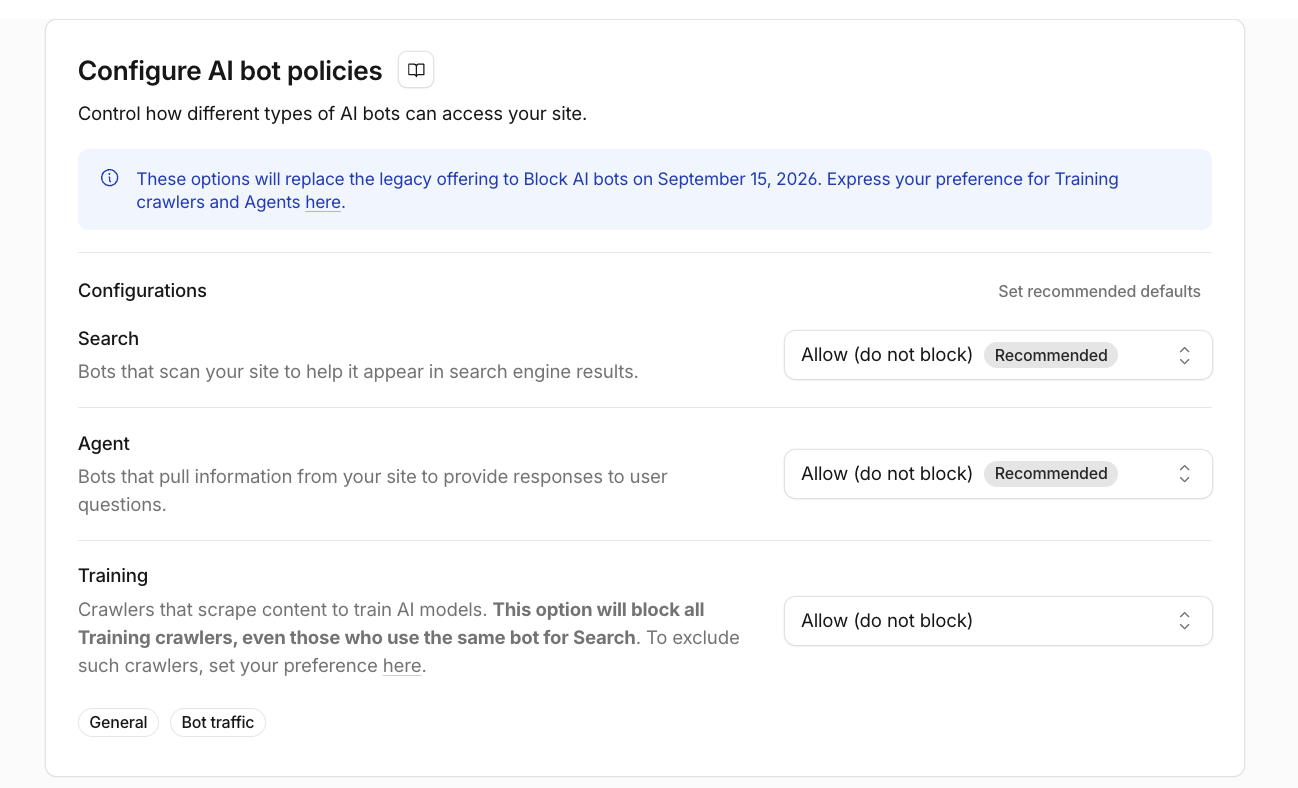
What actually changes on 15 September
Cloudflare has split automated traffic into three categories, each configurable independently.
Cloudflare describes them like this in the dashboard:
| Category | Cloudflare's description | What it is worth to you |
|---|---|---|
| Search | "Bots that scan your site to help it appear in search engine results" | Rankings, discovery, referral traffic |
| Agent | "Bots that pull information from your site to provide responses to user questions" | Citations in AI answers |
| Training | "Crawlers that scrape content to train AI models" | No direct traffic; a licensing question |
Each can be set three ways: allow, block on all pages, or block only on pages where Cloudflare detects advertising.
The new defaults set Training and Agent to block on ad-serving pages, and leave Search allowed. Cloudflare's reasoning is that an ad is a signal the page was meant for a person to land on and see.
Note what Agent actually covers. Those are the bots that fetch your page so an assistant can answer someone's question with it. Blocking Agent does not protect your content from training. It removes you from AI answers. If you have spent any effort on being cited by ChatGPT or Perplexity, that setting is the one to look at hardest.
The warning Cloudflare puts on the screen itself
You do not have to take my word for the Googlebot problem. Cloudflare prints it next to the Training control:
"This option will block all Training crawlers, even those who use the same bot for Search. To exclude such crawlers, set your preference here."
That second sentence is the part almost every article about this change has missed. There is an escape hatch. You can block Training and still exclude the crawlers that also do Search, so Googlebot, BingBot and Applebot keep working.
So the choice is not the binary everyone is presenting. It is three-way:
| What you want | What to do |
|---|---|
| Allow everything | Leave all three on Allow |
| Block training, keep search | Block Training, and set the mixed-crawler exclusion |
| Block training at any cost | Block Training, leave the exclusion off, accept losing Googlebot |
Almost nobody wants the third one. Most people who think they want to block training actually want the second, and will end up with the third by accident.
Who is affected
This is where most coverage is wrong in one direction or the other.
| Your situation | What happens on 15 September |
|---|---|
| New domain onboarding to Cloudflare | New defaults applied: Training and Agent blocked on ad pages, Search allowed |
| Existing customer adding a new site | New defaults applied to that site |
| Existing Free customer who has not changed settings | New defaults applied automatically |
| Anyone with the legacy "Block AI bots" enabled | Mixed-purpose crawlers stop being excluded, so Googlebot falls under the block |
| Anyone who blocks Training manually | Mixed-purpose crawlers are blocked too |
| Anyone who opts out or allows Training | Googlebot is not affected by this policy |
Cloudflare's press release is explicit about the Free tier:
"On September 15, 2026 these changes will also be made for all existing free customers that have not changed their settings by September 15, 2026 in their dashboard."
I am an existing Free customer on this domain, so this applies to me as much as to anyone reading it.
Why blocking Training can block Googlebot
A single-purpose crawler is simple. Block Training, and a training-only crawler such as GPTBot is blocked. Search is untouched.
A mixed-purpose crawler is classified under more than one behaviour. Googlebot crawls for search indexing and for AI purposes in the same bot. When two policies apply and disagree, Cloudflare uses the most restrictive one, so a Training block reaches Googlebot even while your Search setting says allow.
One genuine ambiguity worth flagging. Cloudflare's press release describes the rule as applying to "mixed crawlers that do not give site owners the ability to choose between search, agent use, and training". Google arguably does offer that choice, through the Google-Extended token. Cloudflare's engineering blog nonetheless names Googlebot, Applebot and BingBot directly. I will update this page after 15 September with what the classification turns out to be in practice.
Cloudflare's controls and Google's controls are not the same thing
This distinction is the practical heart of the problem.
Google-Extended is a robots.txt token that controls whether your content is used for certain Gemini training and grounding purposes. Google states plainly that using it does not affect your inclusion or ranking in Google Search.
User-agent: Google-Extended
Disallow: /
That is a precise instrument. It restricts AI training use and leaves Search alone.
A category-wide Cloudflare Training block is a blunt one. It operates at the network edge, and after 15 September it reaches every crawler classified as doing any training, Googlebot included. Same intention, very different blast radius.
What to check before 15 September
1. Find the legacy toggle first. In the Cloudflare dashboard, select the account and domain, then go to Security → Overview → Detection tools → Bot traffic. Cloudflare has labelled the control there "Block AI bots [Deprecating on September 15]", so you do not have to take anyone's word for the date. It now offers three choices: Block, Block on pages with ads, and Allow.
2. Follow the banner to the new controls. Underneath that setting is a notice reading "New options to manage AI bot access are available now in settings." That link leads to the AI crawler access screen, where Search, Agent and Training are configured separately. This is the screen the change is really about, and it is easy to miss because the old control is the one on the page you land on.
3. Write down the current setting for each of the three categories. Each offers Block, Block on pages with ads, and Allow. Cloudflare marks Allow as recommended for Search and Agent, and pointedly gives no recommendation for Training. There is a Set recommended defaults link on the same panel if you want its suggestion applied in one click, though I would rather you chose each one knowingly.
Do not assume that Search set to allow protects Googlebot from a Training block. After 15 September it does not.
4. Decide what the legacy toggle should say. If it is set to Block, it is not blocking Googlebot today and it will be after the deprecation date. That is the single most likely way a site gets caught out. If it already says Allow, re-select Allow anyway, so the choice is recorded as deliberate rather than left as an untouched default.
5. Check everything else that can block a crawler. The AI controls are not the only thing at the edge. Review WAF custom rules, Bot Fight Mode, Super Bot Fight Mode, AI Crawl Control per-crawler rules, managed robots.txt, and any user-agent rules you added by hand. A crawler marked allowed in one place can still be blocked by a rule somewhere else.
6. Write down what you chose and why. You can opt out of the new defaults at any time before the date. If organic search matters to your business, this should be a decision you made, not a default you inherited.
One useful detail while you are in there: the block-response settings let you keep /robots.txt, /llms.txt, /llms-full.txt, /ads.txt and /.well-known/* reachable even for crawlers you block. Worth leaving on, so that blocked crawlers can still read your stated preferences.
What I chose for this site, and why
This site carries no advertising, sells consulting rather than page views, and exists to be found and cited. Restricting training access would cost me discovery and protect nothing I am trying to protect.
So Search is allowed, Agent is allowed, and Training is allowed. The one thing I did do was confirm the setting deliberately rather than let a default decide it in September.
That is my situation, not a recommendation for yours. A publisher whose revenue comes from ad impressions on articles has the opposite calculation, and blocking Training on ad pages is a perfectly rational choice for them.
Which configuration suits which site
Search: allow it. There is no realistic scenario where a business that wants to be found blocks the crawlers that make it findable. Cloudflare marks Allow as recommended and it is right. The only exception is a site that is not meant to be public at all.
Agent: allow it, unless you sell page views. This is the setting that decides whether you can be cited in AI answers. Block it and you disappear from the surface that is replacing search results. An ad-funded publisher may still choose to block it on ad pages, because an answer without a visit earns them nothing. Anyone selling a service rather than impressions should leave it open.
Training: your call, and the only one that is genuinely debatable. Cloudflare does not mark a recommendation here, which is honest of them. It is a licensing question, not a technical one. If you block it, use the mixed-crawler exclusion so you do not take Googlebot down with it.
| Site type | Search | Agent | Training | The thinking |
|---|---|---|---|---|
| Consultant or service business | Allow | Allow | Allow | You are selling expertise. Being quoted is the marketing |
| Ecommerce | Allow | Allow | Allow, or block with exclusion | Agents increasingly research and compare products for buyers |
| Ad-supported publisher | Allow | Block on ad pages | Block on ad pages, with exclusion | An answer without a visit earns nothing |
| Premium or research publisher | Allow | Block or license | Block, with exclusion | The content is the product |
| Private or internal application | Block | Block | Block | Public discovery is not the goal |
The principle underneath all of it: never switch on a category-wide Training block without also setting the mixed-crawler exclusion. That is not an argument for allowing everything. Blocking a training-only crawler such as GPTBot while leaving Googlebot alone is a perfectly coherent position, and Cloudflare gives you the controls to do exactly that.
One more switch on that screen: AI Labyrinth
Directly below the AI bot policies you will find AI Labyrinth, currently in beta and off by default. It is worth understanding before you flip it, because the description sounds alarming to anyone who works in SEO.
It adds hidden honeypot links to your pages. Crawlers that ignore robots.txt follow them into a maze of generated pages and get identified as bad actors across Cloudflare's network. Cloudflare's own documentation says "AI bots that respect no-crawl instructions will safely ignore this honeypot" and "these links do not impact your search engine optimization (SEO) or your website's appearance, and are only seen by bots."
So on Cloudflare's account it is safe for search. My own view is more cautious, and it is a preference rather than a finding: it is a beta feature that modifies the HTML of your live pages, and hidden links have a long and unhappy history in SEO. If your site depends on organic traffic, there is no urgency to enable it. It solves a different problem from the one this article is about, and it is not part of the 15 September change.
How to verify Googlebot is not blocked
Changing a setting is not the same as confirming a result.
In Search Console, run a live URL inspection on your home page and one important internal page. Confirm the live fetch succeeds, the page is available to Google, and Googlebot is not receiving a 403, a 401 or a challenge page. Check that page resources load too. After 15 September, watch the Crawl stats report for a jump in failed requests or a drop in Googlebot activity.
In your logs, filter for verified Googlebot and look at the status codes. Watch for 403s, sudden crawl-volume changes, and challenge pages being served to crawlers. Verify by reverse DNS or Google's published IP ranges rather than trusting the user-agent string, which anything can claim.
Is robots.txt enough?
No, and the difference matters more after this change.
A robots.txt rule states a preference. Compliance is voluntary and it does not stop anything reaching your server. Cloudflare's controls enforce at the network edge, which is genuinely more powerful.
That power cuts both ways. A robots.txt mistake is a request that gets ignored. A Cloudflare misconfiguration is a 403 served to Googlebot.
FAQ
Will Cloudflare block Googlebot on every website? No. There is no universal Googlebot block. The risk applies specifically where a site's policy blocks the Training category, because Cloudflare classifies Googlebot as also serving a training purpose and applies the most restrictive matching rule.
Who is affected by the September 15 change? New domains, new sites added by existing customers, and all existing Free customers who have not changed their settings. Anyone who has blocked Training manually, or through the legacy Block AI bots setting, is also affected regardless of plan.
Does this affect existing Cloudflare customers? Yes, in two ways. Existing Free customers who have not changed their settings receive the new defaults automatically. Existing customers on any plan who block Training find that mixed-purpose crawlers stop being excluded from that block.
What happens if Googlebot is blocked? Google says blocking Googlebot affects Search, Discover, Images, Video and News. Pages already indexed do not vanish immediately, but Google cannot crawl new pages or pick up changes to existing ones, so the damage accumulates quietly rather than arriving all at once.
Are websites without advertisements affected? The new default blocks Training and Agent only on pages where Cloudflare detects ads, so a site with no advertising is not affected by the default. It is still affected if the owner chooses to block a category across all pages, or has the legacy Block AI bots setting enabled.
Does blocking Google-Extended block Google Search? No. Google states that the Google-Extended token does not affect inclusion or ranking in Google Search. It governs certain Gemini training and grounding uses only.
Is robots.txt enough to control AI crawlers? Not on its own. Robots.txt expresses a preference that well-behaved crawlers respect voluntarily. Cloudflare's controls enforce a block at the network edge, which is stronger and correspondingly less forgiving of mistakes.
Should a small business allow Training crawlers? It depends on how the business makes money from its content, and it is a licensing decision rather than a technical one. The point that applies to everyone is narrower: do not apply a category-wide Training block without knowing which Search crawlers it also catches.
Can I block Training without blocking Googlebot? Yes. Cloudflare's Training control includes an option to exclude crawlers that also crawl for Search. Set that preference and Googlebot, BingBot and Applebot keep working while training-only crawlers stay blocked. This is the setting most coverage of the change leaves out.
Is Cloudflare's AI Labyrinth safe for SEO? Cloudflare says it is, stating that the honeypot links do not affect SEO and are only seen by bots, and that compliant crawlers ignore them. It is a beta feature that modifies your live pages, so if organic traffic matters to you there is no particular hurry to enable it. It is unrelated to the 15 September change.
What is a mixed-purpose crawler? A crawler classified under more than one behaviour, such as searching and training, in a single bot. Googlebot, BingBot and Applebot are the examples Cloudflare names. When policies for those behaviours disagree, the most restrictive one applies.
How do I check whether Googlebot is being blocked? Run a live URL inspection in Search Console and confirm the fetch succeeds without a 403 or challenge page, then watch Crawl stats for failed requests after 15 September. If you have log access, filter for verified Googlebot and check the status codes.
Update log
21 August 2026 - Published. Nothing has taken effect yet; the date is still ahead.
I will update this page after 15 September with what actually happens, including whether Googlebot is classified as mixed-purpose in practice given that Google-Extended exists.
Sources
- Cloudflare: your site, your rules, new AI traffic options
- Cloudflare changelog: new options to manage AI traffic
- Cloudflare press release: your content, your rules
- Cloudflare docs: Block AI bots, deprecating 15 September 2026
- Cloudflare docs: AI Labyrinth
- Search Engine Journal: Cloudflare's AI crawler rules can block Googlebot
Need someone to check this for you?
I review how search and AI crawlers reach client sites, and what they see when they get there. Twelve years in search, now focused on AI visibility.
Get in touch →- Published.